Donner implements CSS3 in its own CSS library, donner::css. The library has minimal dependencies and can be integrated into other projects with an adapter that satisfies the donner::ElementLike concept.
donner::css::CSS provides a high-level API for parsing CSS constructs. It is implemented on top of lower-level parser APIs that give finer-grained control over parsing and more detailed error handling.
CSS @import is unsupported. The stylesheet parser emits a warning at the import keyword and ignores the import. It does not request the target stylesheet or follow import chains. Import keywords are recognized after CSS escape decoding and without regard to ASCII case. The diagnostic uses static text and does not repeat the target URL.
Local rules following a semicolon-terminated import still apply. An import reaching EOF is also reported as unsupported; this does not promise recovery of a following rule when its preceding import lacks a semicolon.
Enabled warning sinks retain diagnostics within their existing count and text limits. A refused diagnostic sets the sink's refusal flag; it does not mean an imported resource was requested. Stylesheet rule and payload admission limits remain separate.
SVG parsing maps warnings to document source when a text or CDATA source segment is available. Without source provenance, offsets remain local to the concatenated CSS text. Programmatic style setters ignore imports but do not expose a warning sink; callers needing diagnostics can parse CSS with css::parser::StylesheetParser before assigning it.
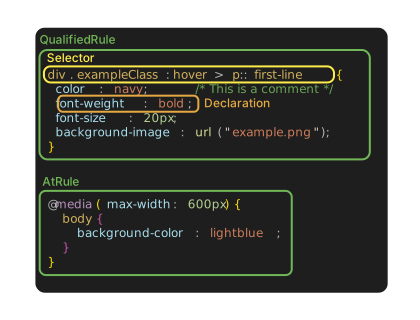
A CSS Stylesheet is composed of a list of rules, each of which contains a selector and a list of declarations.
There are two main rule types:
| Rule type | Example |
|---|---|
| Qualified rule | div { color: red; } |
| At-rule | @media (max-width: 600px) { ... } |
Qualified rules are the most common and are used to apply styles to elements that match a selector. At-rules are used for media queries, keyframes, and other special constructs.
Within qualified rules, there is a selector and a list of declarations. The selector is used to match elements in the DOM, and the declarations are a list of key-value pairs that apply styles to the matched elements.
flowchart TD
  Stylesheet --> SelectorRule

  ComponentValue --> Token
  Token --> String

  Declaration --> QualifiedRule

  Declaration --> ComponentValue
  Rule --> QualifiedRule
  Rule --> AtRule
  AtRule --> SimpleBlock
  AtRule --> ComponentValue
  SimpleBlock --> ComponentValue

  QualifiedRule --> ComponentValue
  QualifiedRule --> SimpleBlock

  SelectorRule --> Selector
  SelectorRule --> Declaration

  Selector --> ComplexSelector
  ComplexSelector --> CompoundSelector
  ComplexSelector --> Combinator
  CompoundSelector --> TypeSelector
  CompoundSelector --> IdSelector
  CompoundSelector --> ClassSelector
  CompoundSelector --> PseudoClassSelector
  CompoundSelector --> PseudoElementSelector
  CompoundSelector --> AttributeSelector

  TypeSelector --> ComponentValue
  IdSelector --> ComponentValue
  ClassSelector --> ComponentValue
  TypeSelector --> ComponentValue
  PseudoClassSelector --> ComponentValue
  PseudoElementSelector --> ComponentValue
  AttributeSelector --> ComponentValue
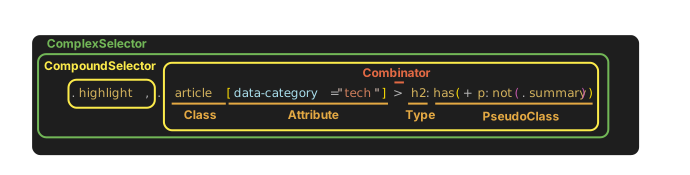
Selectors provide many ways to match elements in the DOM.
| Selector | Example | Description |
|---|---|---|
| TypeSelector | div | Matches all div elements |
| ClassSelector | .class | Matches all elements with the class class |
| IdSelector | #id | Matches the element with the ID id |
| AttributeSelector | [attr=value] | Matches elements with the attribute attr set to value |
| PseudoClassSelector | :first-child | Matches elements in a special state, such as the first child of their parent |
| PseudoElementSelector | ::first-line | Not yet supported, matches special elements in the tree, mostly for text |
Attribute selectors, pseudo-classes, and combinators match elements based on their state or their relationships with other elements.
Selectors can be chained with combinators to create complex matching rules. For example, div > p matches p elements that are children of div elements.
Attribute selectors are used within square brackets on the selector list, such as a[href^="https://"] or h1[title]. Different match modes are available, which are specified by AttrMatcher.
| Matcher | Enum | Description |
|---|---|---|
| ~= | Includes | Interprets the attribute value as a space-separated list of values. Matches if any value in the list is equal |
| \|= | DashMatch | Matches if the attribute value either exactly matches, or begins with the value immediately followed by a dash, - |
| ^= | PrefixMatch | Matches if the attribute value begins with the matcher value |
| $= | SuffixMatch | Matches if the attribute value ends with the matcher value |
| *= | SubstringMatch | Matches if the attribute value contains the matcher value |
| = | Eq | Matches if the attribute value exactly matches the matcher value |
If no matcher is specified, the attribute is matched if it is set to any value, for example, a[href].
| Selector | Matches |
|---|---|
| a[href] | All a elements with an href attribute |
| a[href^="https://"] | All a elements with an href attribute that begins with "https://" |
| a[href$=".pdf"] | All a elements with an href attribute that ends with .pdf |
| a[href*=".pdf"] | All a elements with an href attribute that contains .pdf |
| a[class~="link"] | An alternate way of writing a.link, included here to illustrate the ~= matcher. |
Pseudo-classes match elements in special states, such as being the first child of their parent, or having a child that matches a selector.
| Pseudo-class | Description |
|---|---|
| :root | Matches the root element of the document. |
| :empty | Matches elements that have no children. |
| :first-child | Matches elements that are the first child of their parent. |
| :last-child | Matches elements that are the last child of their parent. |
| :only-child | Matches elements that are the only child of their parent. |
| :nth-child(An+B [of S]) | Matches elements that are the An+B-th child of their parent. S is a Selector that should match child elements to count. |
| :nth-last-child(An+B [of S]) | Matches elements that are the An+B-th child of their parent, counting from the last child. S is a Selector that should match child elements to count. |
| :is(S) | Matches elements that match any of the selectors inside the parentheses, where S is a Selector parsed as a forgiving selector list (invalid selectors removed). |
| :not(S) | Matches elements that do not match the Selector inside the parentheses. |
| :where(S) | Matches elements that match any of the selectors inside the parentheses, where S is a Selector parsed as a forgiving selector list (invalid selectors removed). Same as :is(S), except has a specificity of 0. |
| :has(S) | Matches elements that have a descendant that matches the selector inside the parentheses, where S is a relative forgiving selector list. These may start with a combinator, such as :has(> .highlighted) |
| :nth-of-type(An+B) | Matches elements that are the An+B-th child of their parent, counting only elements of the same type. |
| :nth-last-of-type(An+B) | Matches elements that are the An+B-th child of their parent, counting from the last child and only elements of the same type. |
| :first-of-type | Matches elements that are the first child of their parent and are of the same type. |
| :last-of-type | Matches elements that are the last child of their parent and are of the same type. |
| :only-of-type | Matches elements that are the only child of their parent and are of the same type. |
| :defined | Matches if the element is supported by the runtime. For SVG this would match <path> and not <div>. |
CSS::ParseStylesheet can parse a .css file into a Stylesheet, which contains a list of SelectorRule.
CSS::ParseStyleAttribute parses style="..." attribute values, which are a list of key: value; pairs.
ParseSelector parses a CSS selector, and may be used for implementing querySelector.
flowchart TD
SelectorParser --> Tokenizer
SelectorParser --> AnbMicrosyntaxParser
SelectorParser --> SelectorParser

CSS --> StylesheetParser
CSS --> DeclarationListParser
CSS --> SelectorParser

StylesheetParser --> SelectorParser
StylesheetParser --> RuleParser
StylesheetParser --> DeclarationListParser

DeclarationListParser --> Subparsers
DeclarationListParser --> Tokenizer

DeclarationListParser --> Subparsers
DeclarationListParser --> Tokenizer

Subparsers --> ComponentValueParser

ComponentValueParser --> Tokenizer

Tokenizer --> LengthParser
Tokenizer --> NumberParser

RuleParser --> ComponentValueParser
RuleParser --> Tokenizer
donner::css::CSS wraps the low-level parsing APIs to parse a stylesheet and selectors:
 1.15.0